Home / Blogs / Coding Agents vs. Code Generators: What’s the Difference?
Sushant Mane
June 4, 2026
5 Minutes read
Coding Agents vs. Code Generators: What’s the Difference?
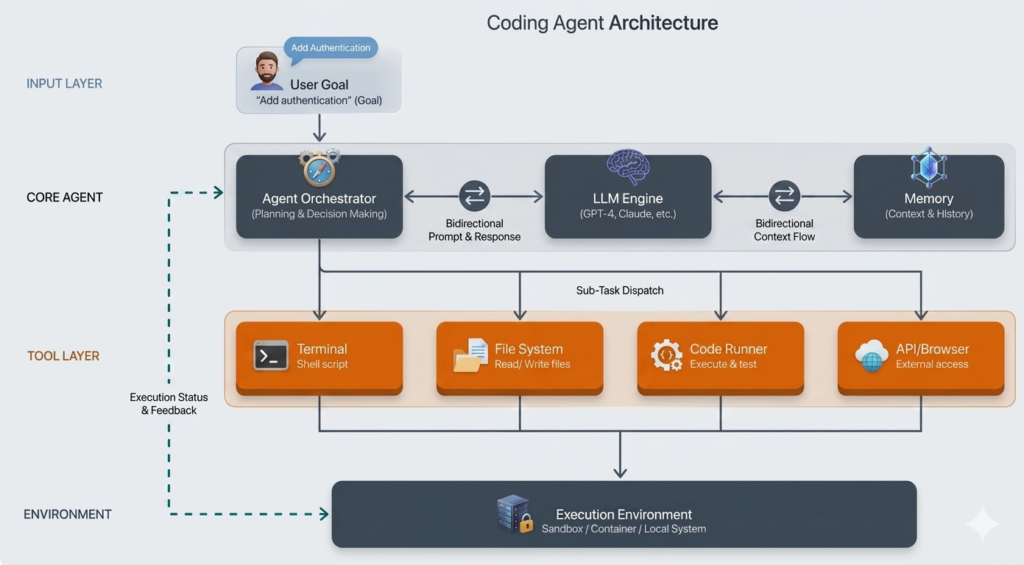
If you’ve been following AI tooling, you’ve probably heard both terms used interchangeably — but they describe fundamentally different things, and choosing the wrong one costs real time. Here’s the clearest way to see the difference: ask an AI to add authentication to a Flask app. One tool gives you a code snippet and waits. Another opens your project, detects the Flask version, installs the right library, writes tests, runs them, fixes what breaks, and confirms it’s done. Same prompt, completely different experience. That’s the gap between a code generator and a coding agent — and it matters more than most teams realize.
Code Generators: Fast, Focused, Single-Step
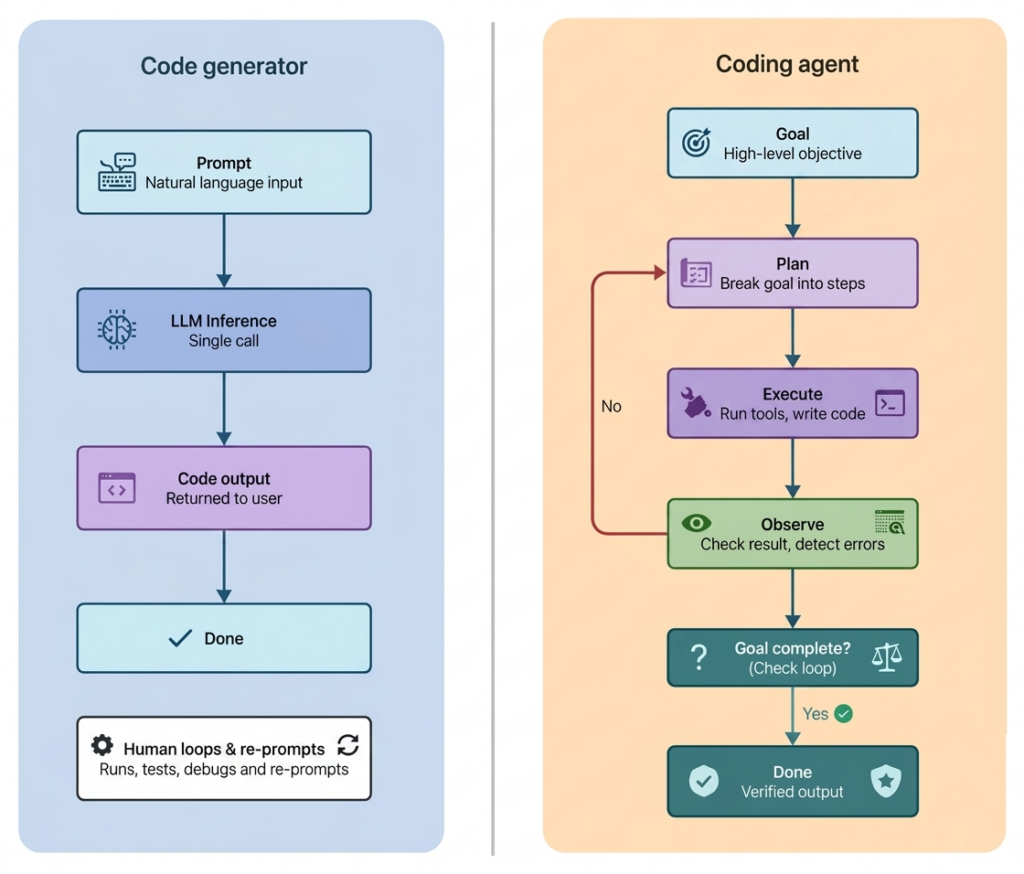
A code generator converts a prompt into code in one shot. No planning, no execution, no feedback loop. Great for functions, boilerplate, and quick snippets — but everything beyond that is on you. It doesn’t run tests, catch errors, or integrate changes across files. You orchestrate every step.
Common Tools (2024–2025): GitHub Copilot, ChatGPT (GPT-4o), Amazon Code Whisperer, Claude in non-agent mode.
Coding Agents: Goal-Driven and Autonomous
A coding agent starts with a goal, not a prompt. It combines an LLM with a planning loop, tool access (terminal, file system, test runners), and persistent memory to run a continuous cycle: receive goal → plan → execute → observe → update → repeat. That loop is what makes it an agent — without it, it’s just a text generator.
Real Tools (2024–2025): Claude Code, Devin, GitHub Copilot Workspace, Cursor Agent Mode, OpenAI Codex Agent.
How the Architecture Differs
The difference isn’t model size — it’s control flow. Generators are reactive: one prompt, one response. Agents are iterative: they pursue goals through planning and action.
Feature
Code Generator
Coding Agent
Single prompt, single output
Yes
No
Multi-step planning
No
Yes
File system access
No
Yes
Test execution capability
No
Yes
Error correction
Manual, human-led
Autonomous
Memory across steps
Limited
Persistent and contextualized
Acts toward a goal
No
Yes
Human orchestration required
High
Lower
A Real Production Scenario
A team migrates a Node.js service from Express 4 to Express 5: with a generator, the engineer prompts the migration guide, manually updates each file, runs tests, debugs failures, and re-prompts for each fix — staying in the loop the whole time. With an agent (Claude Code or Cursor Agent Mode), the engineer sets the goal once. The agent reads package.json, identifies breaking changes, updates affected files, runs npm test, patches the 3 failing tests, and confirms a green build — in a single session. What took half a day takes under an hour.
On well-scoped tasks with clear test suites, coding agents reduce iteration cycles by 60–80% vs. generator-plus-manual-orchestration. The caveat: ambiguous goals or missing tests erode that advantage fast.
When to Use Each
Use a generator when:
Task is single file, contained, and doesn’t need verification
You’re prototyping or learning — speed over autonomy
You need predictable, low-cost output (one inference call)
Use an agent when:
Work spans multiple files, services, or systems
Output needs to be run, tested, and verified autonomously
The workflow involves iteration — try, observe, fix, repeat
You’re doing dependency upgrades, large refactors, or CI/CD automation
Not sure? Start with a generator. If you’re re-prompting the same task with manual steps in between, that’s the signal you need an agent.
What Can Go Wrong
Code Generators
No output validation: The generator has no idea if the code it produces actually works. Bugs, broken imports, and wrong assumptions ship silently if you don’t review carefully.
Context blindness: Without access to your broader codebase, generators frequently suggest solutions that conflict with existing patterns, dependencies, or architecture.
Over-reliance on prompting: Teams can fall into a loop of re-prompting and patching instead of stepping back to rethink the approach — burning time on a solution that wasn’t right to begin with.
Coding Agents
Runaway loops: A poorly defined goal or a recurring error can cause an agent to retry indefinitely. Always set a hard iteration limit.
Unrestricted tool access: Shell access without guardrails can delete files, install unvetted packages, or expose secrets. Scope permissions tightly.
Cost at scale: A complex agent run can hit 100+ inference calls. Track cost per task from day one — it adds faster than expected.
Prompt injection: Malicious instructions embedded in files or API responses can hijack agent behavior. Sandbox everything and treat autonomous execution as a security boundary.
Edge Cases to Watch For
Ambiguous requirements: Agents need clear, testable goals. “Improve this codebase” leads to unpredictable results.
Large legacy systems: Without documentation or test coverage, agents lack the context to plan reliably.
Missing tests: An agent that can’t verify its output may declare success on a broken result.
Observability and Evaluation
With a generator, debugging is simple. With an agent, a failure could have occurred at any point in a 50-step loop. Log every tool call, plan, token usage, and retry attempt. Evaluate on: task completion rate, test pass rate, step efficiency, and cost per task. Without these metrics, you can’t tell if your agent is working well or just appearing to.
The Difference in Code
A code generator: one call, one return. response = llm(prompt) return response
A coding agent: a loop that runs until the goal is met. goal = “Add authentication to Flask project” context = initial_project_state while not goal_completed: plan = llm(create_plan_prompt(context)) action = execute(plan) result = observe(action) context.append(result) if error_detected(result): context.append(analyze_error(result))
Conclusion
At ACL Digital, we use both depending on what the task needs — generators for fast prototyping and early validation, agents for multi-step workflows that require iteration and verification. Together, they’ve compressed timelines across both software and connected systems projects.
Code generators help you write faster. Coding agents help your team ship outcomes faster. Know the failure modes, instrument your observability, sandbox your agents, and match the tool to the task. The difference between the two isn’t just technical — it’s the difference between a tool and a system.